
Use AI. Check HDL code. Verify designs. An assistant can draft a counter, explain a state machine or suggest test ideas. You still need suitable tools to establish whether the change fits your project and behaves correctly under the required conditions.
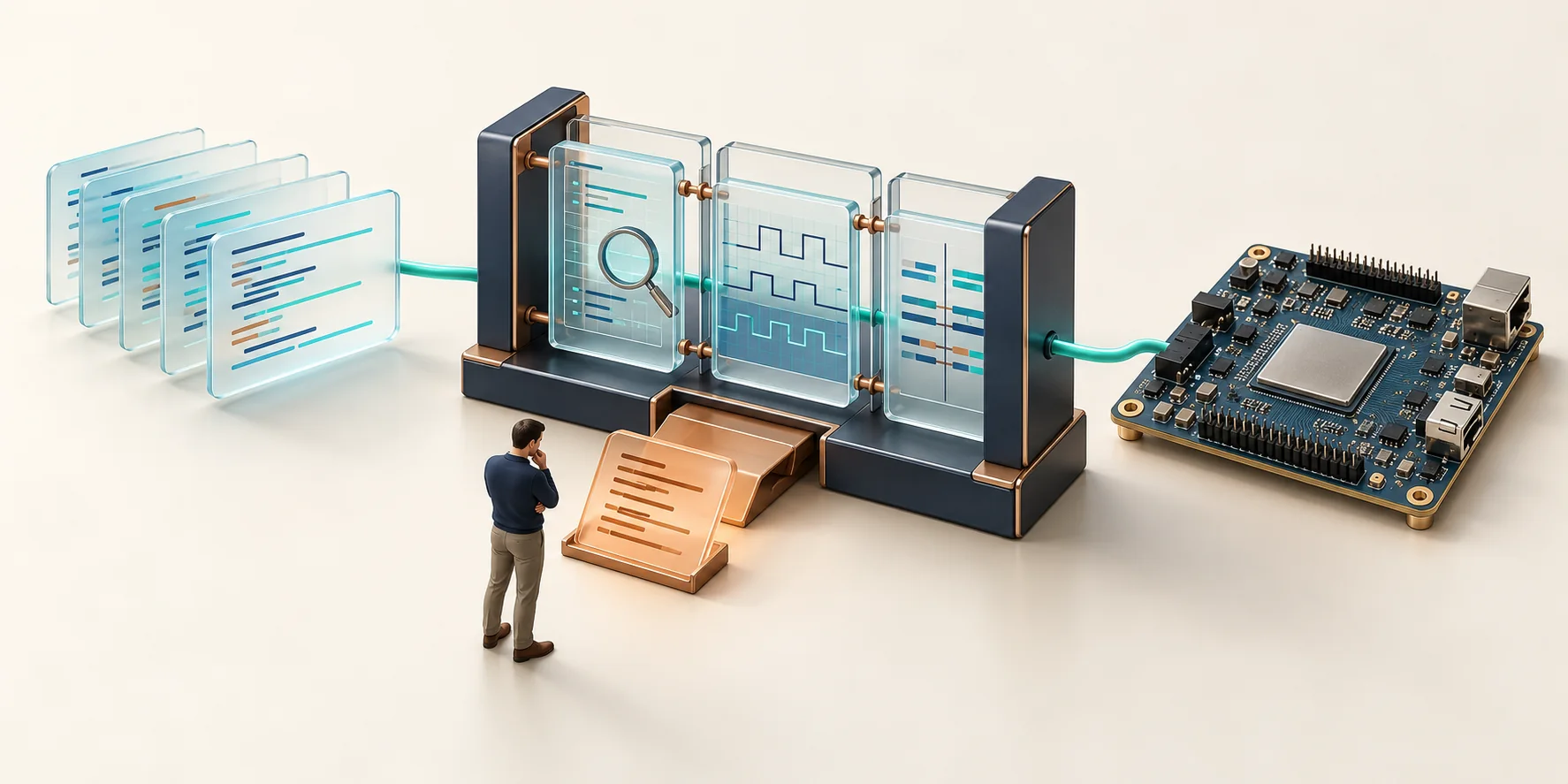
Where AI can help in your development workflow
This topic is for FPGA and ASIC developers, verification engineers and technical decision-makers who want to introduce AI into existing HDL projects in a controlled way. It provides a workflow, concrete tool connections and reproducible examples. Start with your engineering question: do you need to understand an unfamiliar block, implement a bounded change or structure the checks for recurring tasks?
Distinguish three results. A language model produces a proposal. Project analysis produces diagnostics under its configuration. A simulation test produces observations and pass/fail decisions for the scenarios it executes. These results complement one another; none replaces a precise requirement. A helpful explanation may describe an incorrect reset, and syntactically correct HDL can contain a functional error.
EDA Praxis is a technical knowledge portal by eVision Systems GmbH, combining technical advice with a commercial connection to development tools. This selection offers practical guidance, not independent rankings. We identify documented manufacturer features, our own checks and evaluation questions that remain open.
From a task to a reviewable result
Start with a small, bounded task. For a counter, this might define the bit width, active clock edge, reset priority, enable behaviour and overflow. Write down the expected results before an agent changes the code. This gives you a benchmark that cannot quietly shift during the correction process.
- Requirements
Define interfaces, reset behaviour, boundary cases and acceptance tests.
- Draft / change
An agent proposes HDL. Keep changes small and reviewable.
- Project analysis
Check files, libraries and diagnostics in the correct context.
- Simulation / tests
Compare observed behaviour against independent checks.
- Review / release
Review the diff, test results and remaining limitations together.
Feedback, not automatic approval. A failure leads to a justified change. Requirements and tests remain the benchmark; unclear causes or an exhausted attempt limit stop the loop.
The feedback loop needs a record: which file changed, which diagnostic prompted the change, which command ran under which configuration, and which tests actually executed? Keep the initial revision and the results. A green completion message without this traceability is difficult to assess later.
Also set a maximum number of correction attempts. Stop if the same diagnostic recurs, a change outside the task becomes necessary or the agent interprets a requirement differently. Keep tests and acceptance criteria unchanged unless their correction has been separately justified and reviewed. Removing a failing assertion does not make the design more correct.
| Check | Your question | What remains open |
|---|---|---|
| Project and language analysis | Are files, libraries, names, types and configured language rules consistent? | The complete temporal behaviour and intended function. |
| Static structural checks | Are there suspicious structures or violations of the selected rules and assumptions? | Unmodelled requirements, unsuitable constraints and suppressed findings. |
| Self-checking simulation | Does the observed behaviour match the expected results of these tests? | Unexecuted scenarios, incomplete checking models and other implementation aspects. |
| Review and further project checks | Are the change, evidence and remaining risks appropriate for this release? | Synthesis, timing, hardware and project-specific evidence each need their own plan. |
Sigasi: connect project knowledge to an agent
Sigasi Visual HDL can provide the analysis layer in this workflow. Its documented MCP server exposes diagnostics, file context and project symbol search, among other tools. The manual explicitly names GitHub Copilot in VS Code and Cursor. A correctly loaded Sigasi project is required. This does not establish automatic compatibility with every other MCP client. Source: Sigasi MCP server.
For an explicit command-driven workflow, the CLI provides project checks and machine-readable output. The embedded CLI is used in the VS Code terminal with Enterprise; the standalone CLI requires Enterprise (CI). Check these usage routes and licences separately. Sigasi CLI and Embedded Sigasi CLI describe their respective scope.
Older instructions for the integrated SAL chatbot are not a current setup route: the manufacturer manual marks its removal in version 2026.2. The release index available at the source check lists 2026.4.1. Historical SAL notice, release index.
During evaluation, establish whether analysis uses the same project targets, libraries and dependencies as your build. First check a known error, then its deliberate correction. Only then should an agent use the feedback in a bounded loop. Application note: Sigasi and AI agents in project context →
Aldec: assess assistance and verification separately
Aldec documents HDL Copilot from Active-HDL 15 as an OpenAI API-based aid to HDL authoring, including invocation from the editor. This establishes an assistance feature, not a completed functional test of the generated design. Source: Aldec HDL Copilot.
For Riviera-PRO 2026.04, Aldec describes an AI Assistant that connects to multiple AI service platforms and can be invoked in the HDL Editor. Evaluation must establish which platform, model and data path your installation supports and your organisation approves. In particular, this source does not establish support for a locally hosted model. Source: Aldec AI Assistant.
Separately, Active-HDL and Riviera-PRO perform their documented simulation and debugging roles. ALINT-PRO adds static design checks; we do not present it here as a generative assistant. The product pages explain these roles with manufacturer sources.
Assess the whole path: proposal, accepted diff, compilation and elaboration, self-checking test and interpretation of results. Plan the EDA licence, potential model/API costs and data approval separately. Local simulation says nothing about whether the preceding AI request was processed externally. Read the practical guide to Aldec AI assistants →
Start with your specific question
I want to check AI-generated HDL
Start with a small module and independently defined expectations. First check normal operation, reset, priorities and numerical boundaries. Keep a deliberately injected fault separate from the correct reference revision so that a failed test has an unambiguous explanation.
Check VHDL with a self-checking simulation test →I want to connect an agent
Define the permitted files, available tools and stopping conditions. The agent should read actual diagnostics and justify each change. Begin with a confirmed CLI invocation; treat the specific MCP client connection as a separate integration step.
Add project analysis to an agent workflow →I want to select tools
Build requirements around languages, libraries, simulator behaviour, debugging, automation, support and licensing. Compare open-source and commercial tools on the same task. A successful minimal example is a starting point, not complete approval for a team’s workflow.
Assess AI, open source and professional EDA tools →I work with confidential code
Before the first prompt, establish which information may leave your machine. Include diagnostics, file paths and automatically attached project context. Start with an example you own that contains no confidential information. A locally running analysis tool does not automatically restrict the agent’s data access.
Articles and application notes
The following contributions explore fundamentals, agent integration, Aldec assistance, simulation and tool selection. This selection comes from the shared topic and stays connected to the assigned manufacturer and product pages. Each guide identifies its version scope and the checks actually performed or still outstanding.
Article
AI with open-source or commercial EDA tools: what fits your project?
Evaluate GHDL, Verilator, Sigasi and Aldec against language, IP, verification, debugging and operating requirements.
Read articleApplication note
From AI-generated VHDL to a simulation test: a complete example
A counter with fixed requirements, complete testbench and actual GHDL tests, plus an Aldec procedure with explicit test status.
Read articleApplication note
Using Sigasi with AI agents: Analyze HDL in project context
A complete project-analysis workflow with Sigasi CLI, a bounded agent task and an original downloadable VHDL example.
Read articleArticle
AI assistants in Aldec: Capabilities, setup and limits
What is documented for Active-HDL HDLCopilot, Riviera-PRO AI Assistant and static ALINT-PRO checks, with an independent evaluation workflow.
Read articleArticle
AI in FPGA development: what can be automated and what must be checked?
Scope AI tasks sensibly: distinguish project analysis, simulation and requirements checking with a counter example.
Read articleFrequently asked questions about AI-assisted HDL development
Can I put an AI proposal straight into my FPGA project?
Treat it as a proposed change first. Read the diff, compare interfaces and assumptions with your specification, and run the planned checks. Reset priorities, sizing and signedness rules, and behaviour in cases not explicitly described are easy to overlook. Even a short, plausible block may violate a system assumption. Approval should therefore rely on traceable results, not on how convincing the explanation sounds.
Why is clean project analysis not enough?
Analysis assesses the aspects covered by its language support, rules and project configuration. “No diagnostics” does not establish that the design implements your intent. A counter can pass analysis and still count when enable is inactive. A self-checking simulation test must therefore compare observed behaviour with an independently formulated expectation. Other requirements may need other forms of evidence.
Should the same agent write the testbench?
It can provide a draft, but the design and testbench may inherit the same reasoning error. Establish acceptance criteria and expected values in advance. Then check that the testbench actually enforces them and reliably fails on a deliberately faulty revision. Expectations should remain stable when the design changes. A testbench change is a separate change requiring review, not a convenient way to make a failure disappear.
What evidence matters for an agent connection?
Demonstrate on a small project you own that the agent actually invokes the intended tool, examines the correct project revision and uses its output correctly. An available menu entry or reachable interface is insufficient. Record the invocation, result, file diff and repeat check. A different client, edition or new version requires a corresponding integration check.
When should an automated correction loop stop?
At the latest when the cause is unclear, an error recurs, the attempt limit is exceeded or a change falls outside the authorised scope. Also stop when required tools or licences are unavailable: an agent’s explanation cannot replace an executed test. Preserve the last traceable revision and failure output. Then decide explicitly whether to investigate the requirement, configuration, implementation or check.
Does local analysis mean my code stays local?
No. Analysis, the agent, the model and logging may be separate components with different data paths. An agent can transmit local diagnostics or source code to an external model service. Review providers, endpoints, permitted information, retention and effective configuration with the responsible people in your organisation. Confidential code needs a specifically approved solution; “local” on one tool does not establish a guarantee for the entire chain.
Does AI replace a professional HDL or simulation environment?
AI changes how proposals are produced and information is explored. Requirements for language support, project consistency, simulation, debugging and traceable regression remain. The appropriate combination of open-source and commercial tools depends on your designs and team workflow. Test the required constructs, libraries and failure cases rather than inferring suitability from a general product description.
How should I prepare for a consultation or evaluation?
Identify the language and version, operating system, tool versions, project size, key libraries and intended agent workflow. Add two typical problem cases and measurable acceptance criteria. An anonymised minimal example you own is more useful than a general productivity figure. Do not send confidential source code or credentials through the contact form. Availability, licence scope and potential evaluation costs will be clarified for your request.
Tie the next step to your project
Choose a manageable task for which you know the expected outcome. Agree on the checks and data approval first, then on the appropriate combination of analysis, assistance and simulation. This creates a traceable basis for deciding how to proceed.
The manufacturer features discussed here are classified using the linked primary sources checked on 19 October 2026. We did not perform our own test of the described Sigasi or Aldec AI features for this overview. Results from individual examples apply only to their documented test environment.